

Bar Code is a machine readable data consisting a series of black parallel lines.Basically Bar Codes are just numbers in the shape of black or white parallel line.Bar Code was invented in USA in 1952 by Norman Joseph Woodland and Bernard Silver.In this post i am going to show you how to make bar code in Microsoft Excel.
First of all we need to download bar code font 39 that is completely free.
 Bar Code is a machine readable data consisting a series of black parallel lines.Basically Bar Codes are just numbers in the shape of black or white parallel line.Bar Code was invented in USA in 1952 by Norman Joseph Woodland and Bernard Silver.In this post i am going to show you how to make bar code in Microsoft Excel.
.btn { background-color: DodgerBlue; border: none; color: white; padding: 12px 30px; cursor: pointer; font-size: 20px; } /* Darker background on mouse-over */ .btn:hover { background-color: RoyalBlue; }
Download file size is 5.1KB.
Now open downloaded file and run file name “fre3of9x.ttf” don’t worry if you computer not showing tff in the file name.
Now click on install button.
Do same process for second file name “free3of9.ttf”.Font will be installed in your pc.
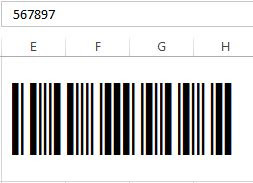
Now open MS Excel and select font name “Free 3 of 9” and type numbers.You will see that your numbers are being converted in Bar Code.
 TechExpertHub